You sit to do your best work—but the wrong chair can quietly sabotage your focus, compress your spine, and drain energy you could spend on deep work. The right chair, by contrast, extends your attention span, keeps your back calm, and helps you finish more in fewer hours.
This 2026 guide turns the “ergonomic chair” from a buzzword into a clear, measurable checklist you can apply to any model—whether you buy one task chair for home or a hundred for a team.
The Science of Sitting Well (2026 essentials)
“Sitting posture” isn’t one position; it’s a range of postures over a day: upright for typing, slight recline for reading, forward for detail work. A chair that protects your spine allows you to move between these states without losing lumbar contact or dropping your elbows below keyboard height. In practice, that means:
- Backrest with adjustable lumbar so the curve meets your lower back as you move.
- Seat depth that supports the full thigh without cutting behind the knees (aim for two to three fingers of clearance).
- Back angle or synchro-tilt that lets you recline slightly (roughly 90–120° seat-to-back range) while maintaining pelvic support.
- Armrests that rise to meet your neutral elbow height—not the other way around—so your shoulders stay relaxed.
- Stable base with smooth casters matched to your floor.
Ergonomic Parameters Explained
- “Lumbar support” vs. real lumbar support: Real systems adjust height (to land in the 150–250 mm zone above the seat) and often depth. Fixed bumps in the wrong place force slouching.
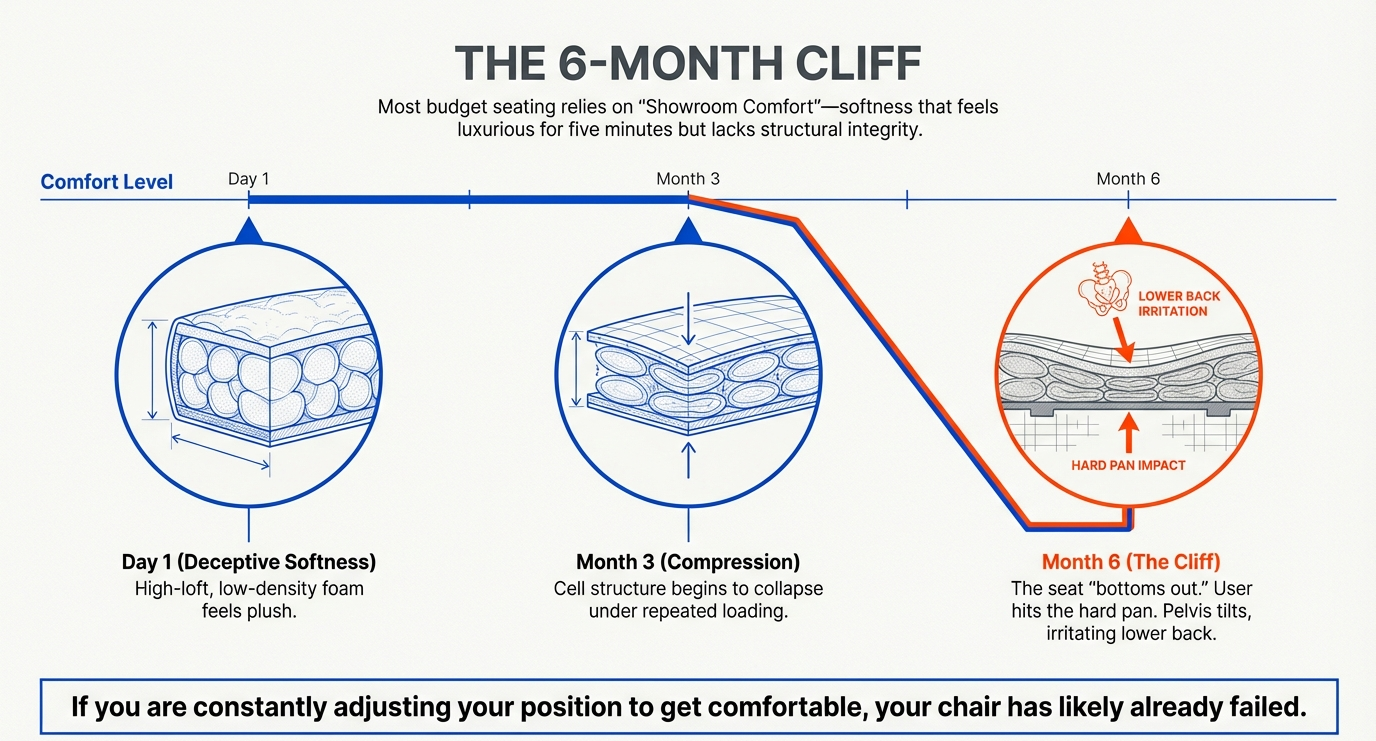
- Seat foam vs. mesh: Foam can bottom out if thin or low-density; mesh must maintain tension under load to avoid hammocking. Comfort is personal—durability and adjustability are not.
- 4D armrests: Height, width, depth (front/back), and pivot (in/out). The goal is simply to meet your elbows without abducting your shoulders or cocking your wrists.
- Synchro-tilt vs. knee-tilt: Synchro usually keeps better lumbar contact during recline; knee-tilt can feel more lounge-like. Neither is “best”—they’re tools to maintain contact and distribute pressure.
- Five-star base: It’s not a luxury; it’s stability insurance and helps prevent tip-over during reaches.
2026 Buyer’s Checklist: What to Demand
Ergonomic Fit & Safety Parameters (2026)
| Parameter | What “good” looks like | How to test it in 30 seconds |
|---|---|---|
| Seat height | Roughly 38–51 cm (15–21 in) coverage for most users, paired with footrest if you’re below range | Sit; feet flat or on footrest, thighs ~parallel to floor |
| Seat depth | Adjustable depth or sizing that leaves 2–3 finger widths between seat front and back of knee | Slide the seat forward/back; check knee clearance |
| Lumbar support | Height-adjustable and ideally depth-adjustable; stays in contact when you recline | Place lumbar at lower back curve; lean and verify contact |
| Backrest & tilt | Tilt or recline that comfortably spans upright to slight recline with adjustable tension | Lean back; backrest should move smoothly and support |
| Armrests | Height to meet elbows, plus width/slide/pivot to keep shoulders relaxed | Rest forearms lightly; shoulders stay down and neutral |
| Base & casters | Five-star base; casters matched to floor type (hard floor vs. carpet) | Push off; chair moves predictably without wobble |
| Fabric & foam | Breathable textile or mesh; foam resists bottoming out | Sit 10–15 min; no hot spots or pan edges pressing |
| Durability standard | Evidence of ANSI/BIFMA X5.1 or similar performance testing | Look for published compliance/testing on spec sheet |
Tip: If you fall outside the 5th–95th percentile for height or leg length, prioritize greater seat height range and a generous seat-depth slider. Petite users benefit most from shallower minimum seat depth; taller users from longer travel.
How to Fit a Chair to Your Body (step-by-step)

1) Set seat height. Feet flat (or on a footrest), thighs roughly parallel to the floor, hips just slightly above knees.
2) Dial seat depth. Slide until you can fit two to three fingers between seat front and the back of your knees.
3) Position lumbar. Raise/lower until the pad fills the small of your back. If depth is adjustable, start shallow and increase until you feel support without pressure.
4) Tune back tension & recline. You should move easily between upright typing and a light recline without losing lumbar contact.
5) Set armrests last. Bring them up to meet your elbows; keep shoulders down and wrists neutral over the keyboard.
6) Micro-movement beats rigidity. Shift posture every 20–30 minutes (slight recline, upright, stand for a call) to maintain circulation.
Health & Productivity: What to Expect When You Get It Right

Pain reduction and comfort stability. Proper lumbar placement and seat-depth matching correlate with fewer low-back and neck complaints over time. For example, the 123ink Luxury Ergonomic Mesh Office Chair with Three-Stage Lumbar Support & Flip-Up Armrests lets you position the pad where your lower back needs it most, then fine-tune support as you change posture. Its 17.3–20.9 in seat-height range via a 100 mm Class 3 gas lift helps you hit neutral knee/hip angles, while the breathable mesh back/seat/headrest limits heat build-up that can trigger fidgeting.
Fewer micro-breaks. When your shoulders and lumbar are supported, you spend less time fidgeting and more time in productive flow. The chair’s flip-up armrests provide quick clearance for close desk work and drop back down to meet your elbows for typing—keeping shoulders relaxed and minimizing strain.
Attention endurance. A posture that alternates between upright and light recline reduces fatigue. The 3-position lock with roughly 98°–125° tilt lets you shift between focus, read, and reflect modes without losing lumbar contact—small posture changes that preserve energy late in the day.
Organizational upside. Across workplaces, ergonomic upgrades (chair + training + fit) are associated with lower musculoskeletal risk, improved self-reported productivity, and fewer lost-time events. A chair that’s rated to 250 lb, uses a stable KD base with black nylon casters, and offers a modern white frame—as in the 123ink model above—tends to hold up to daily use, adapts to varied tasks, and fits mixed office aesthetics, supporting consistent use across teams.
Reality check. A high-adjustability chair without user training is an expensive stool. Budget 10 minutes to fit the 123ink chair on day one and 60 seconds each morning to re-check height, lumbar stage, armrest position, and tilt setting.
The Long-Term Return on a Good Chair
Think in years, not months. A durable, adjustable chair with a basic fitting routine typically pays back through:
- Fewer flare-ups (less pain-driven context switching).
- Higher task throughput (fewer posture corrections mid-flow).
- Lower risk of absenteeism from musculoskeletal issues.
- Better hiring & retention signals (investing in human factors shows up in satisfaction surveys).
For finance stakeholders, treat the chair like other capital equipment: require documented performance testing, expected lifespan (e.g., 8–12 years with parts support), and per-employee productivity assumptions grounded in ergonomics research. Even conservative models (one fewer lost half-day per quarter; 1–2% throughput lift) usually justify the delta between a commodity seat and a tested task chair.
FAQ
Q1: Is BIFMA compliance the same as ergonomics?
A: No. BIFMA primarily tests safety, durability, and structural performance. It tells you a chair is built to withstand years of use—not that it fits your body. Check adjustability ranges to ensure ergonomic fit.
Q2: I’m under 160 cm (5’3″). Can any chair fit me?
A: Yes—look for lower seat-height floors (≈38 cm/15 in) and short seat-depth settings. Pair with a footrest if your feet don’t reach the floor at the correct height.
Q3: Do mesh backs protect the spine better than upholstered backs?
A: Neither is automatically better. Protection comes from consistent lumbar contact through your movement range, plus correct seat depth and arm support.
Q4: My chair has lumbar but still hurts my back—what now?
A: Refit the basics in order: seat height → seat depth → lumbar height/depth → tilt tension → armrests. If you still can’t maintain lumbar contact without pressure points, the chair’s ranges may not fit you.
Q5: How often should I change posture?
A: Aim for frequent micro-movements (small reclines/returns) and periodic standing or walking breaks. Movement maintains circulation and reduces stiffness without hurting productivity.
Q6: For teams, is one model enough for everyone?
A: Usually not. Standardize on two configurations (typical + tall) and keep a few footrests and alternative gas lifts in inventory to cover outliers.
Sources (Updated: 2026)
- OSHA — Computer Workstations eTool: Chairs & Evaluation Checklist (chair features, lumbar, seat depth, five-leg base). OSHA+1
- CCOHS — Office Ergonomics: Ergonomic Chair (fit by user dimensions; seat height guidance). CCOHS
- ISO / CSA — ISO 9241-5: Workstation layout and postural requirements (ergonomic requirements; 2024 update acknowledged). ISO+2Iteh Standards+2
- University of Toronto — Office Ergonomics Standard (lumbar height band 150–250 mm; backrest ranges). Environmental Health & Safety
- Mayo Clinic — Office ergonomics: Your how-to guide (chair adjustment basics). Mayo Clinic
- BIFMA — Standards Overview & X5.1 (R2022); G1 Guidelines (safety/durability scope; dimensional guidance). BIFMA+2BIFMA+2
- A2LA — BIFMA Compliant Program (public registry context). A2LA
- NIOSH / CDC — Ergonomics program benefits (productivity and injury reduction). CDC
- Peer-reviewed & reviews on ergonomic interventions and productivity/pain outcomes (trial and meta-analysis over office workers). PMC+2ScienceDirect+2