This is a review for HP LaserJet Pro M1217nfw Monochrome All-in-One Printer. By reading it, you can get well know about this HP Laser printer. It is a midrange monochrome multifunction laser printer with copy, scan, and fax functionality in addition to standard print features. Let’s have a look.

Firstly, the driverless setup, auto document feeder and range of connectivity options of HP LaserJet Pro’s M1217nfw make it a valuable addition to a small office. In fact, these incentives really attract small offices to shop for such a new printer including wireless networking and Smart Install feature of HP which can make installation just as easy as connecting a single USB cable to a host computer. Moreover, this HP M1217nfw Laser printer is featured with compact and exceptionally lightweight with sizes12 inches tall, 17 inches wide, 10.5 inches deep and 18 pounds weight when all accessories are attached to it. Thus, this printer can put anywhere as you want for it occupied very small space, and you can use it as handles when transporting it around an office by its two wide cutouts on the bottom of each side.
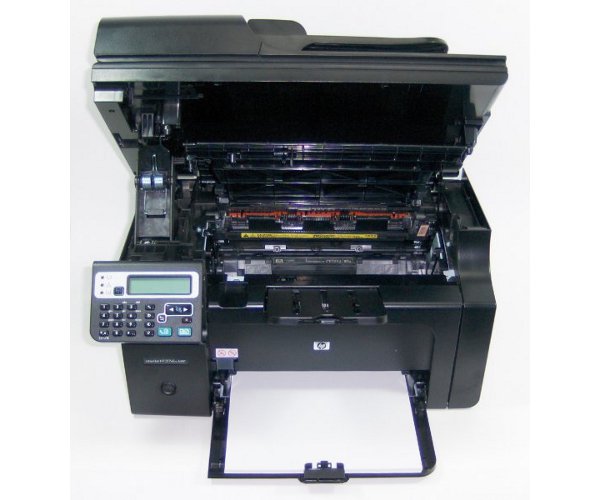
As this HP Laser printer has no the USB or Ethernet cord to make a hardwired connection, you need a cable. The Smart Install app of HP can make it simple to connect and start printing by the new design that embeds the communication drivers into the printer directly. When doing that, you just need to plug the power cable into a wall and connect it to your PC (via USB), then, turn on the printer. In the way, the two machines will take over well and do best. Except that, the Smart Install works with Windows machines only, so to Mac users, there need to throw a standard installation disc in the box. And this printer lacks function such as automatic duplex printing. It may dissuade businesses needs that required high print volume. However, its reasonable price, compact size, speedy performance and simple design can make it a worthy choice for the business. What’s more, you can connect the printer to Ethernet by an Ethernet cable very easily. Just follow the below steps:

Step 1.You must use the control panel of the printer to print out a configuration report by pressing the setup button. Then use either of the arrow keys to select “Reports” from the Main menu and selected “Config report.” Later, the printer will spit out two pages of configuration details including the one has the IP address of the printer.
Step 2.Type the address into the browser of a PC on your network. And click the HP Smart Install tab on the resulting Web page. Then click the green Download button to install the software. After finished that, the printer will print out a test page which confirm it has connected to network.
Moreover, you can connect the printer to a wireless 802.11b/g/n network by do the similar way like connecting to Ethernet when there is no need to enter SSID and password to begin the process. While the printer finds router, a Wi-Fi button which on the front control panel will confirm the connection and print an information sheet.
Except the above, there is a LCD status display console which is small but well-equipped offering all necessary buttons to operate the machine. You can use it in a very easily way. In total, HP LaserJet Pro M1217nfw Monochrome All-in-One Printer is really good enough to use yourself or for a small business workgroup.For more models,you can always check 123ink.ca.