

123ink blog
  • Home
  • Ink & Toner
  • Printers
  • Office Supplies
  • Office Chairs
  • English
    • English
    • Français
No Result
View All Result
123ink blog
  • Home
  • Ink & Toner
  • Printers
  • Office Supplies
  • Office Chairs
  • English
    • English
    • Français
No Result
View All Result
123ink blog
No Result
View All Result

How to Creat a Default PDF Printer Setting

by Andrew Lu
September 22, 2014
in How to, Printer Ink Cartridges
0
Share to Facebook

It requires you to spend some effort in choosing a default printer because there are many printing options available. This will become more of a problem when you work from a network. Besides, there are also various default options for you to choose when you are establishing your settings. PDF printing is confronted with the same situation. It’s not a physical printer. Just follow a few simple and easy steps and you can adjust the default setting in the same way as you adjust other printers. You’ll need a PDF writing program when you do PDF printing.
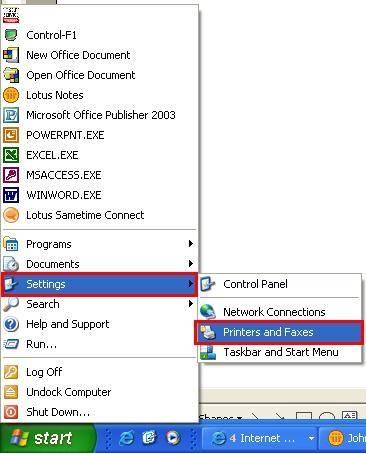
Firstly, click once on both the Windows “Start” button and “Settings”. Select “Printers and Faxes”. And a window which lists all printers available will pop up.

Secondly, right click the “PDF” printing icon. Select “Printer Preferences”. “Adobe PDF” is used in this example. And a “Preferences” window will pop up.

Thirdly, to choose the default settings that are needed for PDF printing, you can use the tabs on the “Preferences” window. Keep in mind that most of the print settings of this (except printer trays ) are the same as with a regular printer. Click “OK” to save the default setting you need.

Right click the “PDF” printing icon once. Choose “Set as Default Printer”. And then the PDF writing program will be used as the default print option for all of your programs. Near the PDF print icon, a check mark can be found.


Related Stories

What Ink or Toner Does My Printer Use? A Quick Guide for HP, Canon and Brother

The Ultimate Guide to Finding Cheap Lexmark Toner Cartridges in Canada: 2026 Edition

How to Choose the Right Compatible Ink for Canon & Brother — Yield, CPP & Failure Rates Explained (2026 Canada Guide)

How to Recycle Ink and Toner Cartridges Properly in Canada (2025 Guide)

Why Printer Ink Costs More Than the Printer in Canada (2025)

Unmissable Black Friday Printer Supply Deals at 123ink

Next Post

Brother HL-2280DW Monochrome Laser Printer Free Shipping,Limited Quantity

Leave a Reply Cancel reply

Your email address will not be published. Required fields are marked *

123ink's Blog

© 2007-2026 123ink Blog. Operated by Shopper+ Inc. All rights reserved.

Navigate Site

  • Shop from 123ink
  • Family of Brands
  • Contact Us
  • English

Follow Us

No Result
View All Result
  • Home
  • Ink & Toner
  • Printers
  • Office Supplies
  • Office Chairs
  • English
    • English
    • Français

© 2007-2026 123ink Blog. Operated by Shopper+ Inc. All rights reserved.