
IYou sit down and the same pattern repeats: the chair’s fixed lumbar bump never quite meets your lower back, your thighs press against the seat edge because the chair sits a bit high, and an hour later your feet are hovering while your shoulders creep upward. That’s where ergonomic back supports and footrests—modular add-ons, not new chairs—can turn a so-so seat into an all-day workstation that protects comfort and focus.
This guide explains how these add-ons work, who benefits, and how to pick and set them up for Canadian homes and offices in 2026. You’ll also get a comparison table, a buying matrix, and a 5-minute setup you can print.
Get Comfortable Fast: Lumbar + Footrest Basics
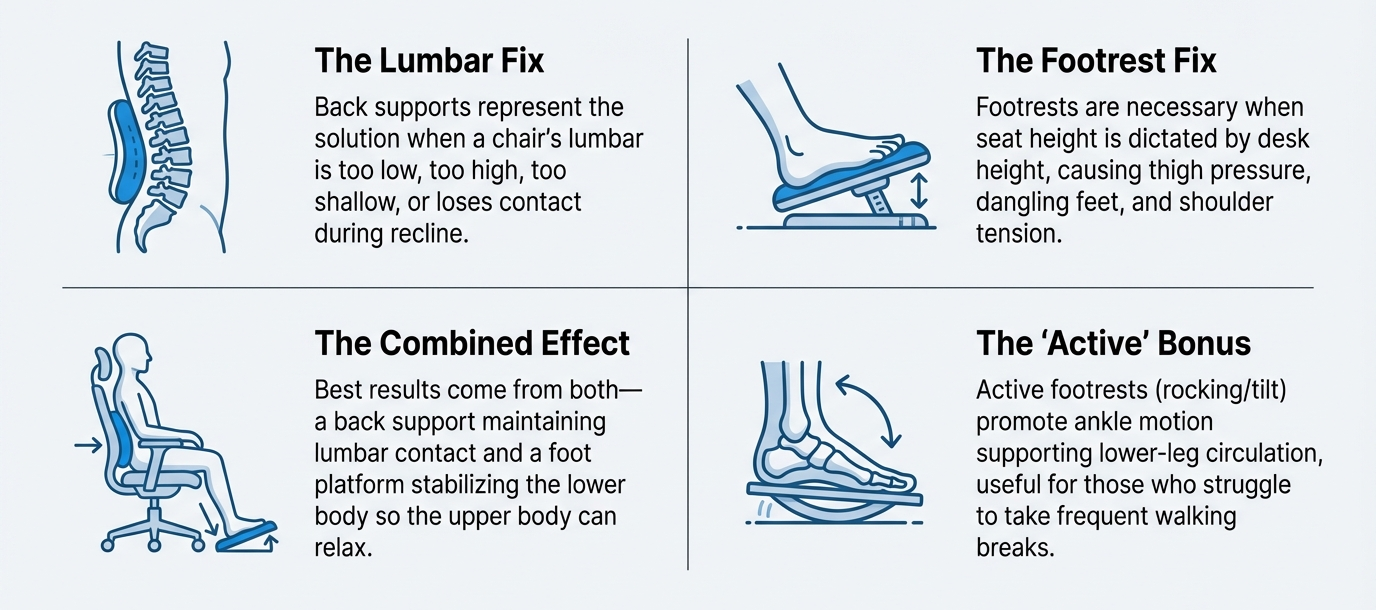
- Back supports help when your chair’s lumbar sits too low/high, is too shallow/deep, or loses contact when you recline.
- Footrests help when seat height is dictated by desk height (common), causing thigh pressure, dangling feet, and shoulder tension.
- Active footrests (rocking/tilt) can promote ankle motion that supports lower-leg circulation during long sits—useful for people who struggle to take frequent walk breaks.
- Best results come from both: a back support that maintains lumbar contact and a foot platform that stabilizes the lower body so the upper body can relax.
Why Back Supports Work (and when they don’t)
What they fix:
- Restore the lumbar curve (gentle anterior pelvic tilt), reducing low-back flexion.
- Keep contact during light recline so you don’t slouch as you rest.
- Fine-tune pressure for different body shapes and seasonal clothing layers.
What to watch:
- Over-thick pillows can push you forward and increase thigh pressure.
- Elastic “mesh straps” often drift; you want anchoring and height control.
Back Support Types (2026 quick compare)
| Type | Best for | Pros | Watch-outs |
|---|---|---|---|
| Height-adjustable lumbar cushion (contoured) | Flat or low chair backs | Places support at belt line; stable | Too thick = forward push |
| Depth-adjustable lumbar | Mixed users / shared chairs | Pressure tuning for layers/body types | Over-pressure = hotspots |
| Inflatable (micro-adjust) | Fine control of firmness | Lightweight, easy to pack | Needs periodic top-ups |
| Mesh strap overlays | Temporary use only | Breathable | Can slip; limited shape control |
A slim, contoured pillow like Moustache® Lumbar Support Pillow (Black) pairs shape stability with a grippy cover so it stays put once you dial height.

Why Footrests Solve “High Chair” Problems
When desk height forces a taller seat, thighs press into the seat edge and feet hunt for support. A good footrest restores a neutral knee/ankle angle, offloads thigh pressure, and steadies the upper body so the lumbar can work.
Footrest Types (including “active” designs)
| Type | Best for | Pros | Watch-outs |
|---|---|---|---|
| Fixed-angle (≈15–20°) | Typing focus | Stable, predictable | Must match user height |
| Height-adjustable platform | Shorter users / tall desks | Restores knee angle, fits many | Bulkier under desk |
| Active/rocking | Long sessions / fidget relief | Micro-movement → ankle pump | Too springy can distract |

A rocker-style platform such as Moustache® Ergonomic Footrest (Black) provides gentle fore-aft motion that encourages ankle flexion while keeping a large, non-slip surface for stable support.
Health Angle
- Back support: Maintaining a natural lumbar curve reduces passive spinal flexion and can ease low-back discomfort in prolonged sitting when paired with correct seat height and arm support.
- Foot support: Stabilizing the feet reduces thigh contact pressure and shoulder elevation; rocking designs add micro-movement that helps the calf muscle pump and venous return during static tasks (not a replacement for walking breaks, but better than full stillness).
Practical takeaway: Use add-ons to enable posture variety—upright for typing, light recline for reading—without losing lumbar contact or letting the feet dangle.
Buying Matrix
| Your pain | Choose this | Why |
|---|---|---|
| Chair lumbar sits too low/high | Slim, height-tunable lumbar cushion | Places support at belt line without pushing you forward |
| Back feels good upright but collapses when reclining | Contoured lumbar + dial tilt tension | Maintains contact through light recline |
| Thigh pressure / feet hovering | Fixed-angle or height-adjustable footrest | Restores knee/ankle angles; lowers shoulder load |
| Long immobile sessions / restlessness | Active/rocking footrest | Micro-movement supports circulation and alertness |
| Shared workstation | Inflatable or depth-adjustable lumbar + adjustable footrest | Fast per-user tuning with consistent support |
5-Minute Setup
- Seat height first: Raise until elbows ~90° at your desk.
- Footrest next: Adjust height/angle so knees ≈ 90–105° and ankles ≈ 90–110°; thighs lightly supported.
- Lumbar placement: Centre at the small of your back (belt line). Start with gentle depth.
- Tilt tension: Set so you can recline 10–15° without losing lumbar contact.
- Armrests: Meet the elbows without lifting shoulders; widen or lower as needed. Re-check footrest once arms are set.
Measured Impact
- Lower back: Less end-of-day ache; fewer “perch” moments at the seat edge.
- Legs/feet: Reduced thigh numbness; calmer fidgeting; warmer toes in winter (better contact, less dangling).
- Focus: Fewer micro-breaks and smoother task switching, especially when active footrests cue subtle motion during long meetings.
Common Mistakes (and quick fixes)
- Lumbar too thick or too low → hotspots or swayback. Fix: go slimmer, move up to belt line.
- Footrest too tall → knees jam upward. Fix: lower platform; keep thighs near parallel.
- Slippery backs/foot platforms → constant micro-slips. Fix: textured covers and rubber feet.
- Everything adjusted, desk still too high → add a keyboard tray or raise the chair and commit to the footrest.
Spec Cues That Predict Durability
- Back supports: contoured core that resists flattening, breathable covers, firm straps that lock, seams that don’t abrade winter fabrics.
- Footrests: wide non-slip top, stable base that won’t creep on hardwood or compress into carpet, controlled rocking range (for active designs), and surfaces that clean easily (winter salt, summer sunscreen).
FAQ (2026)
Q1: Do I need both a lumbar support and a footrest?
Not always. If feet dangle or thighs feel compressed, start with the footrest. If your back collapses in light recline, start with lumbar. Many users keep both for long days.
Q2: Are active (rocking) footrests distracting?
Good ones aren’t. A controlled range promotes ankle movement without pulling you off posture.
Q3: Will a thick lumbar make my back arch too much?
Yes if it’s too deep or too low. Place at the belt line and dial depth to “support, not wedge.”
Q4: Can this prevent DVT?
No device can guarantee prevention. But regular lower-leg movement (e.g., gentle rocking, ankle pumps) plus standing/walk breaks supports circulation during prolonged sitting. Follow medical advice for personal risk.
Q5: How often should I re-check settings?
Do a 60-second check each morning (seat, footrest, lumbar, arms) and after big seasonal clothing changes.