


You search “which printer should I buy” because the choices feel endless—laser vs inkjet vs tank, cheap printers with expensive refills, and subscription plans that sound simple until the math hits. In Canada, most printer regret comes from one mistake: choosing the printer by features or sale price instead of pages per month and true cost per page (CPP).
This 2026 guide gives you a clean decision path, comparison tables, and a checklist you can use in under five minutes—so the printer you buy stays affordable after the first cartridge.
Back to Basics: The One-Minute Answer

If you want the fastest, most reliable “default” choices:
- Mostly black-and-white text (school/work), moderate to heavy printing: get a mono laser printer. Lowest hassle and strong long-term value.
- You need colour often (forms, school projects, charts) but print regularly: get a tank (refillable) inkjet printer if your volume is moderate to high; otherwise a normal colour inkjet.
- You print rarely (once every few weeks): a laser printer is usually safer than inkjet because inkjets are more prone to drying/clogging when idle.
Now let’s make that accurate for your usage.
Step 1: Estimate Your Pages Per Month
You don’t need a perfect number—pick a range.
| Pages/month | What it usually looks like | What matters most |
|---|---|---|
| 0–30 | Occasional forms, shipping labels | Reliability after idle time |
| 30–150 | School drafts, weekly paperwork | CPP + convenience |
| 150–400 | Home office, kids’ school packs | CPP dominates cost |
| 400+ | Side business, frequent printing | Speed, duty cycle, supply strategy |
If you’re not sure, check your last 30 days: count the print jobs in your history and multiply by average pages.
Step 2: Learn the Metric That Actually Predicts Cost
Cost per page (CPP) beats “cheap printer” every time
CPP is how you avoid the classic trap: a low-cost printer that becomes expensive the moment you need supplies.
CPP formula
CPP = supply price ÷ ISO page yield
- ISO yield is a standardized test result for cartridges (so comparisons are fair).
- Real-world pages vary (more photos = lower yield), but CPP still predicts which system is cheaper over time.
What CPP doesn’t show (but you must)
- Printing frequency (rare printing increases inkjet maintenance waste)
- Cleaning cycles (infrequent inkjet use can burn ink in head cleaning)
- Paper usage (duplex can cut paper cost almost in half for readings)
Step 3: Choose Your Printer Type (Laser vs Inkjet vs Tank)
A 2026 comparison you can trust
| Type | Best for | Typical strengths | Typical downsides |
|---|---|---|---|
| Mono laser pirnter (black-only) | Text-heavy work, school drafts, home office | Low CPP, crisp text, doesn’t dry out | No colour |
| Colour laser pirnter | Colour documents at moderate volume | Fast, office-style colour, low mess | Higher upfront, photos usually mediocre |
| Inkjet pirnter | Colour + occasional photo printing | Great colour/photos at low volume | Ink can dry; CPP varies widely |
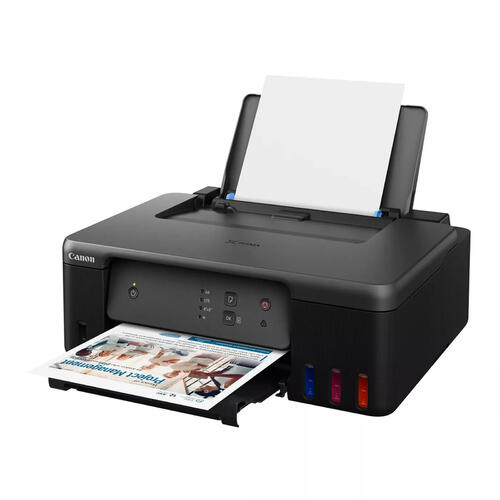
| Tank / refillable inkjet pirnter | Regular colour printing at mid/high volume | Very low CPP when used consistently | Not ideal if you print rarely |
Rule of thumb (Canada 2026):
If you print often, tank inkjets can be the cheapest colour path. If you print rarely, laser usually wins on “it works when you need it.”
Step 4: Pick by Use Case
1) Student / Family Printing (Mostly Text + Some Colour)

- Best default: mono laser printer+ use colour only when necessary (campus print shop or occasional home colour).
- Why it wins: low CPP, no dried heads after breaks, predictable results.
2) Home Office (Weekly Paperwork, Forms, Shipping Labels)

- Best default: mono laser if colour is optional; tank inkjet if colour is weekly and meaningful.
- Must-have features: reliable Wi-Fi printing, decent paper handling, duplex if you print lots of pages.
3) Photo-Heavy Hobby / Crafting

- Best default: quality inkjet (cartridge or tank) designed for photos.
- Reality check: photo printing eats ink. If you do this rarely, expect maintenance and higher CPP.
4) Side Business / High Volume
- Best default: mono laser for invoices/labels; add a separate colour solution only if truly needed.
- Avoid: entry-level inkjets used sporadically—maintenance waste can erase savings.
Step 5: The Biggest Buyer Traps and How to Avoid Them
Trap A: “Printer price is low, so I’m saving money”
Low printer price often means supplies will carry the profit. Your real cost is printer + supplies over a year.
Fix: before buying, price one full set of supplies and compute CPP.
Trap B: Comparing by features instead of fit
ADF, duplex, touchscreens—nice, but if CPP is brutal, you’ll pay for it forever.
Fix: choose features after type + CPP are acceptable.
Trap C: Subscriptions that don’t match your real printing pattern
Subscription plans can work for steady monthly printing, but many households print in bursts (midterms, tax season).
Fix: estimate your pages/month across the whole year, not just busy months.
Trap D: Inkjet + long idle time = “mystery costs”
Many inkjets waste ink in cleaning cycles when unused.
Fix: if you print rarely, prefer laser—or commit to a weekly test page.
Step 6: OEM vs Compatible vs Remanufactured Supplies (Risk vs Savings)
This is where most of the money is.
What each option means
- OEM (Original): manufacturer-branded supplies; generally most consistent, highest cost.
- Compatible: newly made third-party supplies; often the best CPP value when sourced responsibly.
- Remanufactured: recycled shells refilled/rebuilt; quality can vary more.
A practical stability view (home printing)
| Supply type | Typical cost | Typical reliability | Best for |
|---|---|---|---|
| OEM | $$$ | Highest | photo fidelity, warranty comfort |
| Compatible | $ | High (varies by source) | students, home office, draft-heavy |
| Remanufactured | $$ | Medium (varies) | eco-first buyers willing to vet |
The key variable isn’t just the cartridge—it’s the seller quality and batch consistency.
In Canada, many home users evaluate supplies by comparing ISO yields, CPP, and availability before they commit to a printer model. 123ink is often used in this step because shoppers can typically see OEM vs compatible vs remanufactured supply options side-by-side, making it easier to estimate long-run printing costs without guesswork.
Step 7: How to Think About Total Cost
You don’t need perfect numbers—use this as a decision framework.
| Printing profile | What dominates cost | What usually wins |
|---|---|---|
| 0–30 pages/month | Reliability + waste from maintenance | Laser often wins |
| 30–150 pages/month | CPP + convenience | Laser for text; inkjet if colour matters |
| 150–400 pages/month | CPP is everything | Laser (text) or tank (colour) |
| 400+ pages/month | Speed + duty cycle + CPP | Laser systems dominate for text |
Step 8: Must-Have Specs
For most Canadian homes, prioritize:
- Duplex (auto two-sided) if you print readings/contracts
- ADF (automatic document feeder) if you scan/copy multi-page documents
- Paper tray capacity that matches your life (kids’ school weeks vs occasional)
- Wi-Fi stability + mobile printing support
- Clear supply ecosystem (availability + CPP options)
Nice to have (not dealbreakers)
- Big touchscreens, fancy apps, “smart assistant” features
Step 9: A 5-Minute Printer Buying Checklist
- Estimate pages/month: 0–30 / 30–150 / 150–400 / 400+
- Decide if you truly need colour weekly (yes/no)
- Choose type: mono laser / colour laser / inkjet / tank
- Check supply costs and compute CPP
- Confirm duplex/ADF needs
- Confirm paper size/handling needs
- If printing rarely, plan for laser or weekly inkjet test page
- Avoid models with unclear supply availability in Canada
- Don’t choose by printer price alone—choose by one-year cost
FAQ
Q1: Which printer should I buy for home use in Canada in 2026?
If you mainly print text, a mono laser is the safest default. If you need colour weekly and print regularly, consider a tank inkjet.
Q2: Is a laser printer cheaper than an inkjet?
For black-and-white text, often yes—laser tends to deliver lower CPP and fewer maintenance issues. For frequent colour, tank inkjets can beat laser CPP.
Q3: How many pages per month justify a tank printer?
If you print colour regularly—often 150+ pages/month—tank economics become attractive. If you print rarely, tank can be less efficient due to maintenance needs and idle time.
Q4: Will compatible cartridges void my warranty in Canada?
Warranty rules depend on the situation, but blanket “void” claims are often overstated. Keep receipts and avoid ultra-cheap unknown supplies. If service is needed, having OEM as a fallback can reduce friction.
Q5: Why does my ink dry out even when I barely print?
Inkjet systems can dry or clog when idle. If you print infrequently, laser is usually more reliable—or print a simple test page weekly.
Q6: What’s the cheapest way to print school packets?
Use draft mode when possible, duplex for readings, and reserve colour printing for essential pages. For very large packets, compare home CPP versus local print shop rates.
Sources (Accessed/Updated: 2026)
- ISO/IEC page-yield standards (for comparing cartridge/toner yields using standardized methods). (Source: International Standard, Updated: 2026)
- ENERGY STAR imaging equipment guidance (usage patterns, efficiency considerations, and operational behavior). (Source: Official Resource, Updated: 2026)
- Canadian consumer guidance on warranties and third-party consumables (general principles for warranty disputes and documentation). (Source: Official Guidance, Updated: 2026)
- Public university print service pricing pages (as a benchmark for per-page costs vs home CPP). (Source: Official Resource, Updated: 2026)




Thank you for sharing this useful post. Purchasing a printer is a big investment so it is very important before buying a printer that you need to always remember some important things such as what is your need, brand name, quality, cost and model.